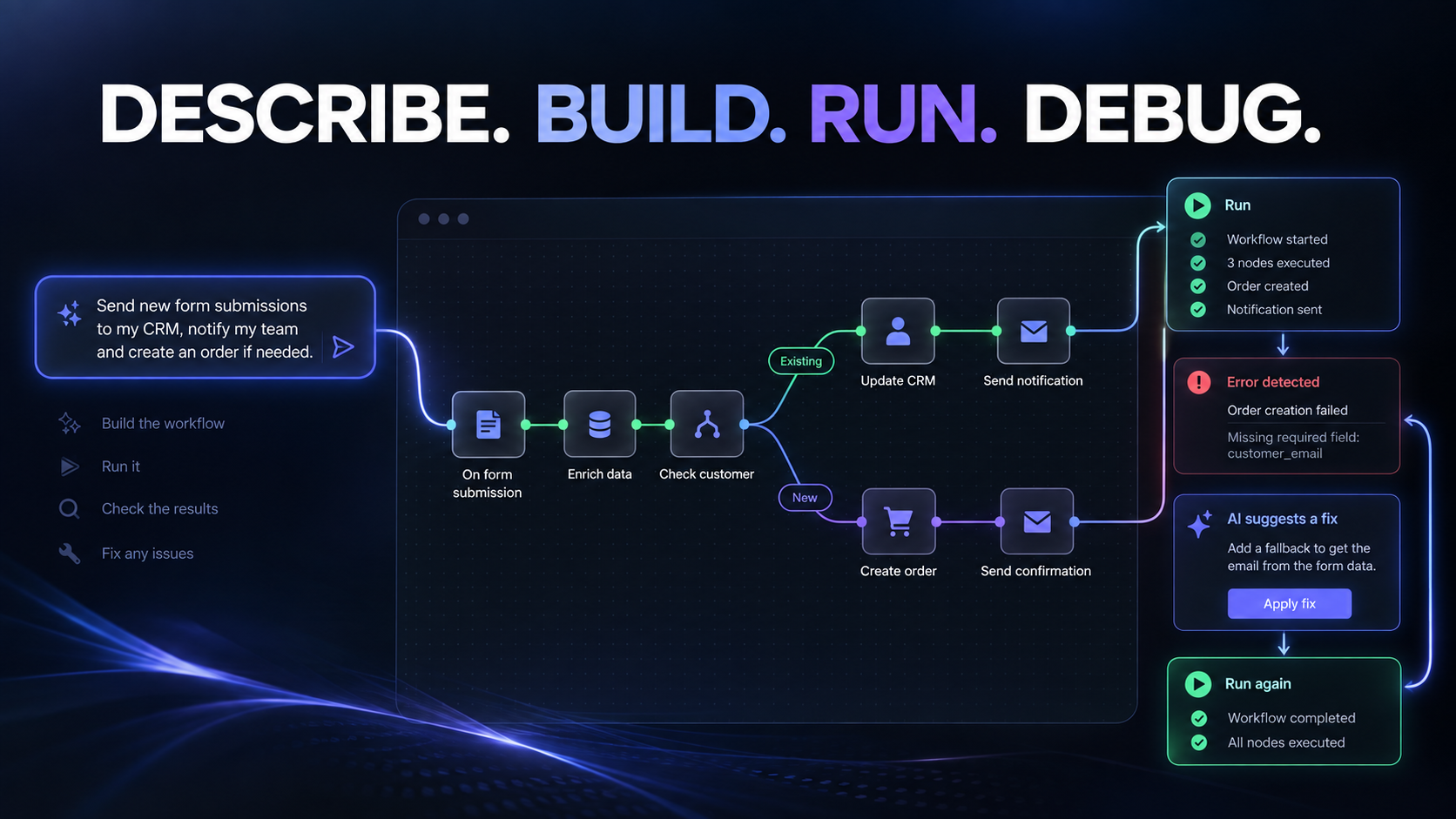
Most automation projects do not fail because n8n cannot talk to HubSpot or Shopify. They stall in the gap between “we need new form leads in Slack and the CRM” and knowing which nodes, in which order, with which credentials. When the first run errors, you are back in docs and forum threads for an afternoon you did not budget.
n8n Assistant, announced 9 September, targets that gap. You describe the outcome in plain language. It plans a workflow, builds it on your canvas, asks for credentials when a node needs them, runs it, reads the same execution data you would open yourself, proposes a fix, applies it, and runs again. What you keep is a standard n8n workflow: visible nodes, editable by hand, logged on every execution, owned by the team rather than by whoever typed the prompt.
That matters more than the demo sentence. Plenty of tools can generate an automation from a chat. The ones that hurt later are the ones that leave you with hosted code nobody else can read, a one-shot run that vanishes when the session ends, or an explanation that amounts to “the model decided to.” Assistant’s bet is the opposite: same canvas, same nodes, same logs.
What actually shipped
Availability, from n8n’s blog:
- n8n Cloud: on by default for new instances. Enterprise Cloud is excluded from that default for now (Enterprise is on the roadmap).
- Self-hosted Docker: from version 2.36+, bring your own keys and set the extra environment variables. npm installs are not supported.
- Still behind a preview flag while they ship more.
Confirmation gates stay with you for credential access and workflow activation. Assistant draws on your plan’s AI credit allocation, counted separately from the old AI Workflow Builder. Multi-round debugging burns more credits than a clean first build. Top-ups are coming; do not hard-code a fixed euro cost from the launch post.
n8n is explicit about limits worth keeping on the sticky note: the first workflow is not guaranteed production-ready; reviewing it is still your job; it cannot create third-party accounts you do not have; it is not proactive monitoring; it works on one instance; it does not drive your browser. Treat preview like a junior builder who leaves you the graph.
Why canvas + logs beat chat-only builders
The same week, the competitive beat is Make’s ChatGPT side: ChatGPT can call existing on-demand Make scenarios via Make’s MCP toolbox. That is useful when the scenario already exists and you want to trigger it from a chat session. n8n’s answer is different. Assistant assembles on the canvas inside the product you already operate, then runs and debugs there.
For a Spanish agency handing work between people, that difference is operational. A colleague who was not in the prompt can open the workflow next week, change a filter, and see why last night’s run failed. You are not explaining a disposable chat one-shot.
Pattern A: a dozen forms → AI classify → Slack / email / WhatsApp → CRM
The pattern we see on typical EU client stacks: lead intake is not one form. It is Typeform, Webflow, native WordPress, Shopify contact forms, maybe a landing-page tool, all dumping into the same sales inbox. Humans copy-paste into HubSpot, Pipedrive or Attio and ping WhatsApp when something looks hot.
A useful Assistant prompt is outcome-shaped, not node-shaped: “When any of these forms submit, classify the lead, enrich the company if we can, alert sales on Slack and email, send a WhatsApp only when score is high, and create or update the contact and deal in HubSpot / Pipedrive / Attio.”
What you should expect to review on the canvas:
- Intake nodes for each form source (or a webhook funnel that normalises them).
- An LLM node for classification and a short summary (language detection matters for ES/EN bilingual desks).
- Enrichment from a company-data source or your own catalog, with a clear rule when enrichment returns empty (sole traders, freelancers).
- Branching to Slack + email always; WhatsApp only behind a score or intent gate.
- CRM write that fails loud on required fields rather than silently creating half-empty records.
On HubSpot specifically, API version /2026-09/ started enforcing admin-configured write validation on CRM creates and updates (conditional required properties, Create Record requirements). An Assistant-built graph that “worked” against a loose portal can start returning 400s once the portal has real rules. That is a feature for data hygiene. Design the workflow to surface MISSING_REQUIRED_PROPERTY style failures instead of retrying forever. Pipedrive and Attio have their own required-field cultures; same principle: map required properties before you activate.
Pattern B: Shopify, Magento or WordPress commerce events → CRM and ops
Ecommerce clients rarely need another dashboard. They need order and customer events to land where sales and ops already work.
Illustrative stack: Shopify (or Magento / WooCommerce on WordPress) fires order created, order paid, refund requested, or customer created. The workflow should:
- Normalise the payload (currency, tax, line items).
- Upsert the customer and deal or order record in HubSpot / Pipedrive / Attio.
- Post a compact ops alert to Slack when payment fails or refund volume spikes.
- Optionally push a status into a custom ERP or middleware without pretending the ERP is a toy API.
Assistant can scaffold the node graph quickly. Your job is idempotency (do not create three contacts for one checkout), PII minimisation in Slack (no full card data, careful with addresses), and deciding which events are noise. Magento and WordPress stacks often arrive messier than Shopify webhooks; budget review time for field mapping, not for the prompt.
Pattern C: SAP or custom ERP ↔ CRM hygiene
Heavier Spanish B2B clients often run SAP or a custom ERP as system of record for orders, inventory or invoices, with the CRM as the sales surface. The pedagogical pattern is not “replace SAP.” It is hygiene:
- When ERP order status changes, update the CRM deal stage and a last-synced timestamp.
- When CRM marks a deal won, create or update the downstream order request in the ERP only if required commercial fields are present.
- Fail loud and notify a human channel when mappings break.
Keep this high level. Do not invent SAP BAPI names in a marketing draft. The point for Assistant is the same as for hand-built n8n: the graph must be readable when finance asks why a stage moved at 02:00.
AI on the same canvas (without turning outbound into a liability)
The AI layer belongs inside the workflow, not as a separate magic box. Typical uses that fit EU agency work:
- Classify and summarise form or CRM notes before a human sees them.
- Draft a reply the sales rep can edit.
- Enrich from firmographic or catalog sources.
GDPR and AI Act habits that should be nodes, not vibes:
- Lawful basis for enrichment and for any profile you send to a third-country LLM or data vendor.
- Minimise PII in prompts (hash or drop phone/email when the model only needs industry and company size).
- Human gate before WhatsApp or email goes out. Assistant’s activation and credential confirmations help; they do not replace an approval node on customer-facing sends.
- Article 50 / disclosure if AI-generated text reaches the public or shoppers in ways your contracts already cover.
- Logging: keep enough execution history to explain a bad send without storing every raw prompt forever.
Name the hype calmly
Assistant lowers the translation tax from sentence to graph. It does not remove ownership. Preview builds will be wrong about edge cases (empty enrichment, required CRM fields, odd Magento payloads). Credits will climb when you debug those edges. Enterprise Cloud users are not on the “on by default” path yet. Chat-only builders elsewhere still leave you with something harder to hand over. None of that makes Assistant useless. It makes “activate and forget” the expensive mistake.
Checklist before you activate
- Read every credential node. Confirm which HubSpot / Shopify / WhatsApp accounts are in scope.
- Run against synthetic or historical test payloads, including empty enrichment and missing required CRM fields.
- Add explicit failure branches to Slack/email for 400 validation errors and ERP timeouts.
- Put a human approval step before any customer-facing WhatsApp or email.
- Check AI credit burn after two real debug loops; decide if the workflow is worth the meter.
- Document the workflow in one paragraph for the next person on the account.
- Only then activate.
The automation tax just dropped for teams that already live in n8n. The price of admission is still reviewing the graph.